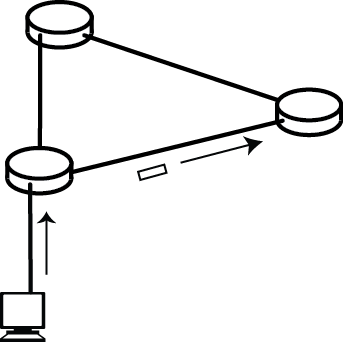
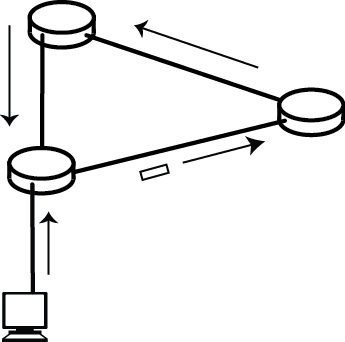
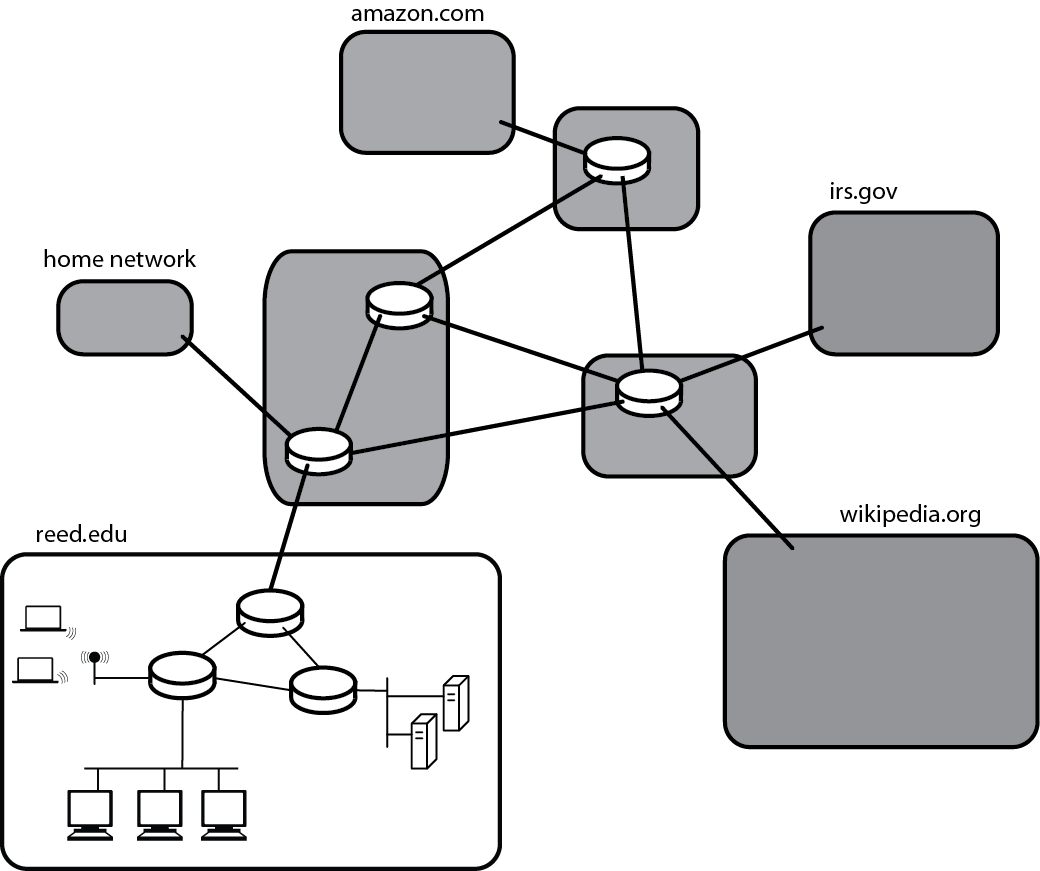
My computer -> www.sfc.keio.ac.jp My computer ---> router in studio art building closet ---> router at edge of Reed network ---> router at network provider...
To prevent infinite loops, limit the lifespan of packets
Traceroute
% traceroute www.sfc.keio.ac.jp
traceroute to www.sfc.keio.ac.jp (133.27.4.221), 64 hops max, 52 byte packets
1 clarkacad (134.10.2.44) 1.214 ms 0.926 ms 1.340 ms
2 borderrouter (134.10.64.2) 0.909 ms 0.863 ms 0.731 ms
3 206-169-234-117.static.twtelecom.net (206.169.234.117) 0.943 ms 0.914 ms 0.863 ms
4 64-129-238-138.static.twtelecom.net (64.129.238.138) 15.637 ms 15.664 ms 15.670 ms
5 te-9-4.car1.sanjose2.level3.net (4.59.0.229) 15.884 ms 15.819 ms 15.853 ms
6 vlan80.csw3.sanjose1.level3.net (4.69.152.190) 16.005 ms 18.096 ms 24.721 ms
7 ae-81-81.ebr1.sanjose1.level3.net (4.69.153.9) 16.337 ms 16.031 ms 15.975 ms
8 ae-2-2.ebr3.losangeles1.level3.net (4.69.132.10) 23.428 ms 23.507 ms 24.543 ms
9 ae-93-93.csw4.losangeles1.level3.net (4.69.137.46) 23.420 ms
ae-73-73.csw2.losangeles1.level3.net (4.69.137.38) 32.388 ms
ae-83-83.csw3.losangeles1.level3.net (4.69.137.42) 28.521 ms
10 ae-1-60.edge5.losangeles1.level3.net (4.69.144.11) 23.699 ms
ae-3-80.edge5.losangeles1.level3.net (4.69.144.139) 23.449 ms
ae-4-90.edge5.losangeles1.level3.net (4.69.144.203) 23.646 ms
11 japan-telec.edge5.losangeles1.level3.net (4.59.48.2) 23.209 ms 23.487 ms 23.497 ms
12 tokyo-dc-gm2-xe5-3-2-vlan10.s4.sinet.ad.jp (150.99.2.81) 136.906 ms 136.761 ms
tokyo-dc-gm2-xe4-3-0-vlan10.s4.sinet.ad.jp (150.99.2.77) 164.841 ms
13 tokyo-dc-rm-ae4-vlan10.s4.sinet.ad.jp (150.99.2.53) 151.746 ms 137.422 ms 137.273 ms
14 keio.gw.sinet.ad.jp (150.99.188.18) 153.990 ms 141.243 ms 141.152 ms
15 bb-sfc-core0-hc.bb.keio.ac.jp (131.113.1.166) 151.238 ms 151.232 ms 151.367 ms
16 fw1-entry-sfc.bb.keio.ac.jp (131.113.255.78) 126.761 ms 139.489 ms 139.620 ms
17 gw2.sfc.keio.ac.jp (133.27.3.1) 140.368 ms 152.952 ms 139.885 ms
18 www.sfc.keio.ac.jp (133.27.4.221) 140.742 ms 153.864 ms 140.836 ms
Hit Ctrl-C to stop.
If a packet is not acknowledged within the expected timeout, an asterisk is displayed.
% traceroute www.amazon.com traceroute to www.amazon.com (72.21.211.176), 64 hops max, 52 byte packets 1 clarkacad (134.10.2.44) 1.196 ms 1.059 ms 1.013 ms 2 borderrouter (134.10.64.2) 0.801 ms 0.947 ms 0.854 ms 3 206-169-234-117.static.twtelecom.net (206.169.234.117) 0.884 ms 5.872 ms 1.154 ms 4 sea2-pr2-xe-1-3-0-0.us.twtelecom.net (66.192.253.122) 4.654 ms 4.574 ms 4.556 ms 5 64.132.69.202 (64.132.69.202) 4.502 ms 4.342 ms 4.388 ms 6 dca2-edge-01.inet.qwest.net (67.14.28.110) 77.527 ms 78.077 ms 77.656 ms 7 72.165.86.74 (72.165.86.74) 78.548 ms 78.287 ms 78.247 ms 8 72.21.220.157 (72.21.220.157) 79.836 ms 87.652 ms 72.21.220.125 (72.21.220.125) 80.156 ms 9 72.21.222.147 (72.21.222.147) 84.281 ms 114.044 ms 78.168 ms 10 72.21.218.13 (72.21.218.13) 80.088 ms 79.859 ms 79.559 ms 11 * * * 12 * * * 13 * * * 14 * * * 15 * * * 16 * * * 17 * * * 18 * * * 19 * * *
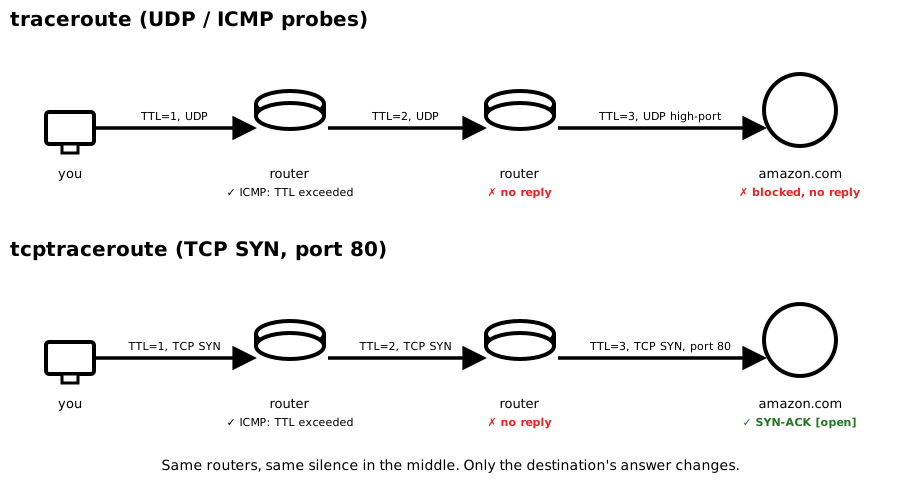
Many routers and firewalls block the ICMP/UDP packets traceroute relies on. This is why you see rows of * * *:
Workarounds:
Option 1: tcptraceroute
sudo tcptraceroute hostname (enter your password when prompted; install once with brew install tcptraceroute).
Option 2: Web-based tools
% traceroute www.amazon.com traceroute to e15316.dsca.akamaiedge.net (2.18.102.138), 64 hops max, 40 byte packets 1 10.0.0.1 (10.0.0.1) 13.893 ms 4.476 ms 4.232 ms ... 8 50.222.131.142 (50.222.131.142) 25.716 ms * 76.173 ms 9 * * * 10 * * * 11 * * * 12 *^C % sudo tcptraceroute www.amazon.com Tracing the path to www.amazon.com (3.163.152.189) on TCP port 80 (http), 30 hops max 1 10.0.0.1 4.637 ms 5.521 ms 3.935 ms ... 7 be-36221-cs02.seattle.wa.ibone.comcast.net (68.86.93.53) 21.109 ms * * 8 be-2211-pe11.seattle.wa.ibone.comcast.net (96.110.32.230) 23.483 ms * 22.540 ms 9 * * * 10 * * * 11 * * * 12 * * * 13 * * * 14 server-3-163-152-189.sea90.r.cloudfront.net (3.163.152.189) [open] 20.288 ms 22.731 ms 25.910 ms
Plain traceroute dies completely after hop 8, not even the destination replies. tcptraceroute reaches Amazon's edge server at hop 14 and confirms the TCP handshake succeeded ([open]). The middle hops still show * * * in both runs, those routers won't reply regardless of probe type, so TCP mode doesn't fix the missing hops in the middle, it fixes whether you hear back from the destination at all.
Caveat: tcptraceroute isn't a guarantee either. It defaults to a 30-hop limit (plain traceroute defaults to 64), so a longer real path, or a temporary routing hiccup somewhere in the middle, can still end in "Destination not reached" even when the site itself is completely fine. If that happens, try sudo tcptraceroute -m 64 hostname to rule out the hop limit, and try again in a few minutes, backbone routing hiccups like this are often transient.
Plain traceroute: tracert
tracert -h <n>.
C:\> tracert www.mit.edu C:\> tracert -d www.mit.edu // -d skips DNS lookups, like -n on Unix
TCP traceroute: no built-in equivalent
C:\> nmap -sS -p 80 --traceroute www.amazon.com // run Command Prompt or PowerShell as Administrator
sudo: reading the raw packet responses needs elevated privileges.
--traceroute only works with a raw-packet scan type like -sS, not the no-privilege -sT connect scan, that's what pulls in the admin requirement.
Summary:
traceroute, Windows tracert. Neither needs admin rights.
sudo tcptraceroute, Windows nmap -sS --traceroute run as Administrator. Both need elevated privileges, for the same underlying reason.