We start together with three short live demos. After that you work through the page on your own: three checkpoints, then the lab.
alert(), prompt() and console.log() all work before you start.
12 into a prompt(), add 1 to it, and see what comes out.
(Slide: Getting User Input: prompt())Demo file: Samples/js_02_live_demo.html
<!DOCTYPE html> <html> <body> <script> alert("Hello from alert()"); let name = prompt("What is your name?"); console.log("Hello from console.log()"); console.log(name); </script> </body> </html>
<!DOCTYPE html> <html> <head></head> <body> <script src="myscript.js"></script> </body> </html>The file myscript.js contains only JavaScript, no
<script> tags needed:
// content of myscript.js
console.log("hello");
alert("world");
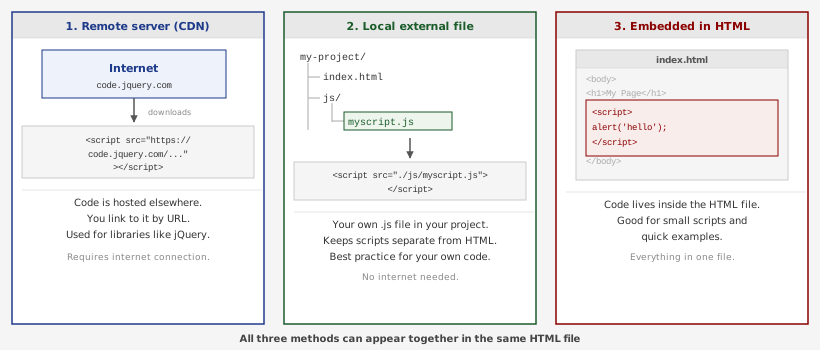
<body> <script src="https://code.jquery.com/jquery-3.2.1.min.js"></script> <!-- 1. from another server --> <script src="./js/myscript.js"></script> <!-- 2. local external file --> <script> alert('hello'); </script> <!-- 3. embedded directly --> </body>In this course we will write our JavaScript embedded directly inside
<script> tags (method 3).
You will still see external files in other people's code and whenever you load a library.
checkpoints.html. You will keep adding to this same file in Checkpoints 2 and 3.YOUR NAME with your name:<!DOCTYPE html> <html> <body> <script> console.log("YOUR NAME"); </script> </body> </html>
⌘⌥J).console.log. Capital letters matter.
alert and Alert are different.;
console.log('hello world');
alert('yikes');
let brushSize = 10; // this is a single-line comment /* This is a multi-line comment. Author: Jane Smith This script draws a grid of colored squares. */Comments are ignored by the browser. They are notes for the programmer. Use them to explain why the code does what it does, not just what it does.
Note: older JavaScript code uses var instead of let.
They work similarly here, but let is the modern standard, so use it.
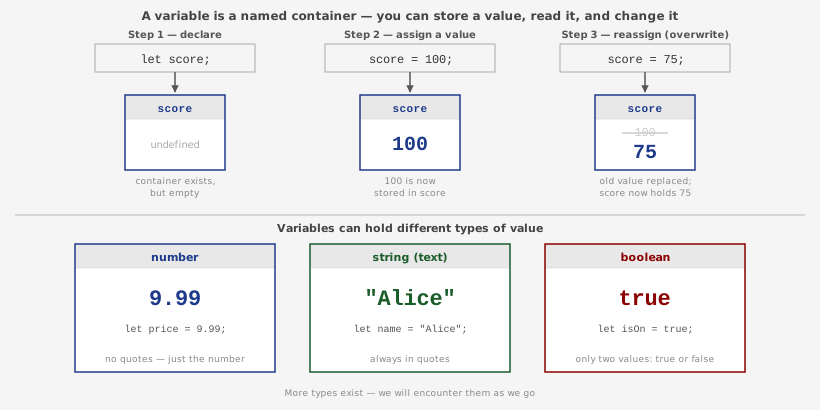
let declares (creates) the variable and gives it a name.
You can then assign a value to it with =.
<!DOCTYPE html> <html> <body> <script> let canvasWidth; // declare: the container exists, but it is empty (undefined) console.log(canvasWidth); // what prints here? canvasWidth = 800; console.log(canvasWidth); // what prints here? canvasWidth = 1200; // overwrite with a new value console.log(canvasWidth); // what prints here? // declare AND assign in one line let margin = canvasWidth * 0.1; console.log(margin); // what prints here? // variables can hold text too, called a string let artworkTitle = "Blue Study"; console.log(artworkTitle); </script> </body> </html>When storing text (strings), always wrap it in quotes. Without quotes, JavaScript thinks it is a variable name, not text.
let artworkTitle = "Blue Study"; // correct: text in quoteslet artworkTitle = Blue Study;// error! JS looks for two variables named Blue and Study
+ - * /<!DOCTYPE html> <html> <body> <script> let panelCount = 2; // a diptych: one painting split into two panels let paintingWidth = 24.5; // inches let frameWidth = 3.75; let totalWidth = paintingWidth + frameWidth; console.log(totalWidth); // what is this? let panelWidth = paintingWidth / panelCount; console.log(panelWidth); // operator precedence: * and / happen before + and - // use parentheses to control the order let a = 1; let b = 2; let c = 3; console.log( a + b + c / 3 ); // NOT the average. Why? console.log( (a + b + c) / 3 ); // the average. Why is this different? </script> </body> </html>
panelCount++; // same as panelCount = panelCount + 1 panelCount--; // same as panelCount = panelCount - 1 totalWidth += 5; // same as totalWidth = totalWidth + 5 totalWidth -= 2; // same as totalWidth = totalWidth - 2
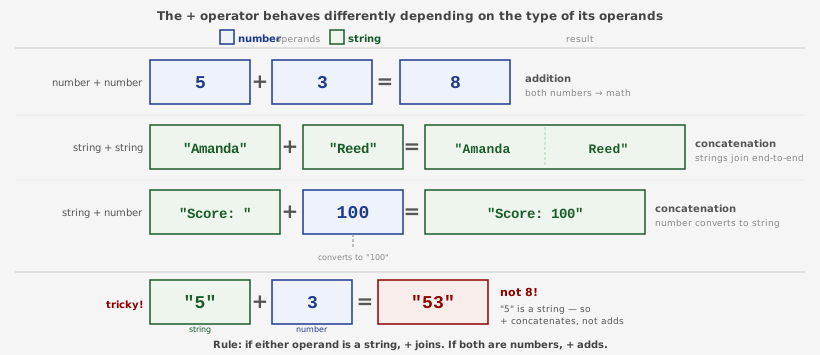
+ does two different things depending on what it is given:
<!DOCTYPE html> <html> <body> <script> let firstname = "Amanda"; let lastname = "Reed"; alert(firstname + lastname); // what does this show? alert(firstname + " " + lastname); // and this? // mixing a string and a number let series = "Untitled #"; let number = 3; alert(series + number); // what does this show? // tricky: what about number + number when one is actually a string? let a = "5"; let b = 3; alert(a + b); // addition or concatenation? predict first </script> </body> </html>
| operator | what it does | expression | result |
|---|---|---|---|
+ |
addition | 5 + 1 |
6 |
+ |
concatenation | "Reed" + " " + "College" |
"Reed College" |
- |
subtraction | 4 - 2 |
2 |
* |
multiplication | 2 * 3 |
6 |
/ |
division | 6 / 3 |
2 |
% |
modulus (remainder) | 10 % 3 |
1 |
checkpoints.html, below your console.log line and inside the same <script>, create four variables:
artistName: your name (a string)title: "Untitled #" (a string)number: any number, for example 3year: 2026 (a number)+ to build one alert() that reads like a gallery wall label:
Untitled #3, Amanda Reed, 2026You will keep working on checkpoints.html in Checkpoint 3 and submit it at the end (see "What to Submit").
<!DOCTYPE html> <html> <body> <script> let firstName = "Alex" let lastName = "Park"; let fullName = firstName + " " lastName; let printPrice = 40; let Prints = 3; let total = printPrice * prints; console.log(fullName + " sold " + prints + " prints for $" + total); </script> </body> </html>Hint: there is a missing semicolon, a missing operator, and a case mismatch. One of these does not cause an error at all. Which one, and why? (Look back at the Ask box on Statements.) The bug is gone when the console shows
Alex Park sold 3 prints for $120 with no red errors.
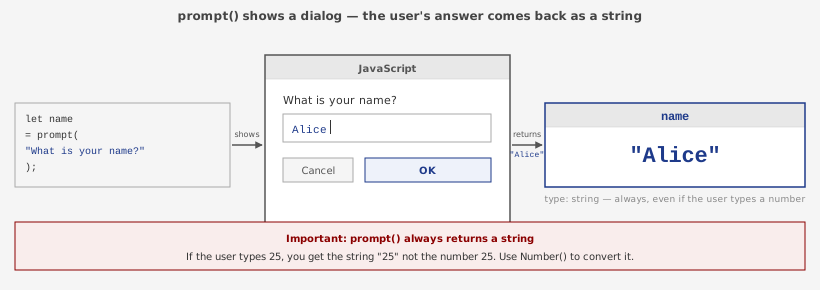
prompt() is a built-in browser method that shows a dialog box with a question.
Whatever the user types and clicks OK, prompt() returns that text back to your code, always as a string.
We use a variable to catch and store it. This is exactly what variables are for.
let name = prompt("What is your name?");
// ^^^^ the variable catches what prompt() returns
// ^^^^^^^^^^^^^^^^^^^^^^^^^^^^^^^^ prompt() shows this question and returns the answer
<!DOCTYPE html> <html> <body> <script> let name = prompt("What is your name?"); alert(name + ", welcome to the studio!"); let color = prompt("What color are you drawn to lately, " + name + "?"); alert(color + "? Good choice for a first sketch."); let hours = prompt("How many hours a week do you spend making art?"); // Note: prompt() always returns a string. // Number() converts it to a number so we can compare it. // (We will cover if/else properly in a later lesson.) if (Number(hours) < 5) { alert(hours + " hours? Every sketchbook starts somewhere."); } else { alert(hours + " hours? You have a real practice going!"); } </script> </body> </html>Note: We haven't look at
if / else yet. For now, just observe what it does.
checkpoints.html, change your wall label so the viewer supplies the title.
title with a question:
let title = prompt("What is the title of your piece?");
artistName and year, and update your alert() so the label uses the typed title.prompt(), for example the medium ("oil on canvas", "digital"), and add it to the label.Night Walk, Amanda Reed, 2026, oil on canvas.
checkpoints.html which already asks the viewer a question and answers with a label.
Create conversation.html that talks to its viewer: a gallery guide, a fortune teller, a character with a mood, an interview.
prompt() and alert(), create a short conversation with the viewer.
Your script must:
prompt()alert() that
combines strings and variables with + (for example: "Amanda, you called your piece Night Walk. What time of night is it?", where Amanda and Night Walk come from prompt())if / else statements so the
conversation changes depending on the viewer's answer (for example, if the viewer says A, respond one way, otherwise respond another way)checkpoints.html, or from this blank file:
<!DOCTYPE html> <html> <body> <script> // write your prompt() and alert() calls here </script> </body> </html>
~myname/ILCP/JS02/Put these three files in it:
checkpoints.html: Checkpoints 1, 2 and 3 in one file (the wall label that uses prompt() for the title and medium)nobug.html: the fixed bug code, with a comment explaining what you fixedconversation.html: the Lab, a short conversation with the viewer using prompt(), alert() and if / elsehttps://people.reed.edu/~myname/ILCP/JS02/checkpoints.html) and make sure it runs with no red errors in the console.