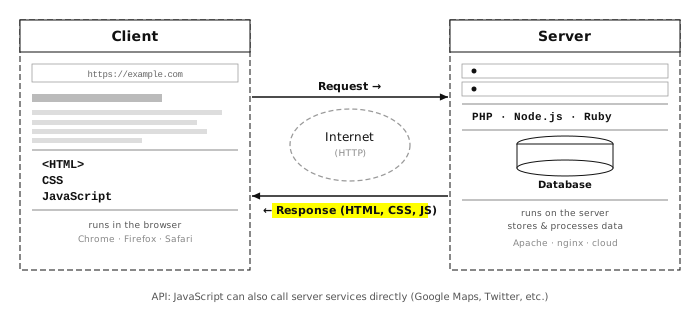
HTML + CSS + Javascript
Javascript:
<!DOCTYPE html>
<html>
<head>
</head>
<body>
<script>
window.alert('hello world');
</script>
</body>
</html>
</body>.
This is because JavaScript may reference HTML elements that haven't been created yet —
the browser reads and renders HTML from top to bottom, so a script that tries to access
a <div> before that <div> appears in the file will fail.
Placing the script at the bottom ensures all elements exist before JavaScript runs.
defer attribute to a <script> tag in <head>
and the browser will wait until the page is fully loaded before running it:
<script src="myscript.js" defer></script>
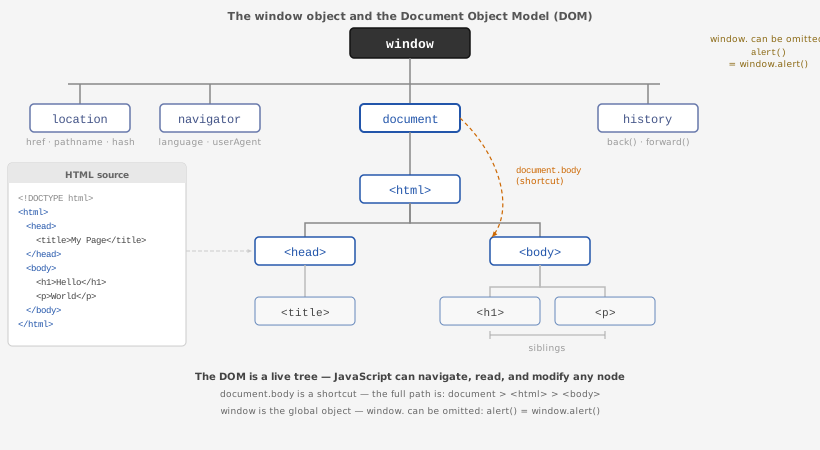
parent.child.
Each dot moves one level deeper. Because window is the global root, its prefix is optional.
<!DOCTYPE html> <html> <head> <title>My Test Page</title> </head> <body> <h1>Hello World</h1> <p>Some text here.</p> <script> // reading properties console.log( window.location.href ); // full URL of this file console.log( document.title ); // "My Test Page" console.log( navigator.language ); // e.g. "en-US" console.log( document.body.innerHTML ); // all HTML inside <body> // calling a method window.alert('hello'); // opens a popup — same as alert('hello') </script> </body> </html>
Sample file: 01_hello.html
<!DOCTYPE html>
<html>
<head>
<title> The Title of this HTML Page </title>
</head>
<body>
<script>
window.alert('hello world');
</script>
</body>
</html>
will open up an alert window with the message hello world.
<script>
document.write('Hello document');
</script>
If you run the above script, the text "Hello document" will be displayed in the body of the HTML page.
document.write() is considered outdated and is rarely used in modern JavaScript.
A better alternative for printing output and debugging is console.log(), which
writes to the browser's JavaScript console instead of the page:
<script>
console.log('Hello console');
</script>
You will use console.log() constantly as you write more JavaScript — it is how you inspect values without changing the page.
The use of Javascript console is a must. Before asking anyone else why your javascript does not work, make sure you check the console.
On Chrome (Mac):View -> Developer -> JavaScript Console
It can be cryptic at first but it is helpful in:
See what kind of error message you see in the console when you:
) after the argument listallert instead of alertconsole.log('hello from the console'); line to the script and open the JavaScript console.
Can you see the message there?
) from alert('hello world')alert(hello world')allert('hello world')ILCP JS01 Lab: Your Name.SyntaxError or ReferenceError)