Localhost: 127.0.0.1

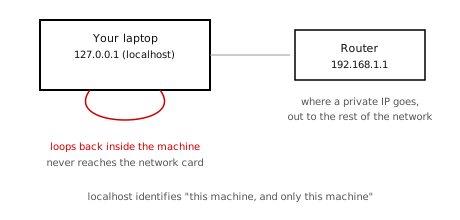
A laptop sending traffic to 127.0.0.1 that loops back inside the machine, compared to normal traffic that goes out to the router
Not the same thing as a private IP. A private address identifies your device to other devices on your home network. 127.0.0.1 never leaves the device at all, not even as far as the router.

This is why a local web server (VS Code's Live Server, or anything running at http://localhost:3000) is only reachable from the same machine it runs on. Nobody else on your network, or the internet, can reach it at that address.

Ask:
"My laptop has both 127.0.0.1 and a private IP like 192.168.1.14. What's the difference, and when would each one actually get used?"
Notes
Private IP Addresses

Reserved private ranges (RFC 1918), off-limits to the public internet:
RangeCommon use
10.0.0.0 – 10.255.255.255larger networks, offices
172.16.0.0 – 172.31.255.255mid-size networks
192.168.0.0 – 192.168.255.255home routers, most common
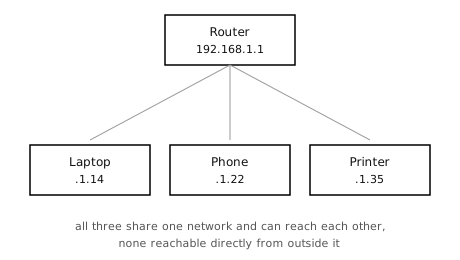
A router at 192.168.1.1 connected to a laptop, phone, and printer, each with a private IP address on the same home network
Ask:
"Why does it matter that private IP addresses only need to be unique inside one network, not the whole internet?"
Notes

Public IP Addresses

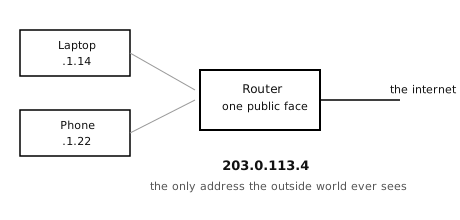
A laptop and phone behind a router that shares one public IP address, 203.0.113.4, with the internet
Notes

The Router: Network Address Translation (NAT)

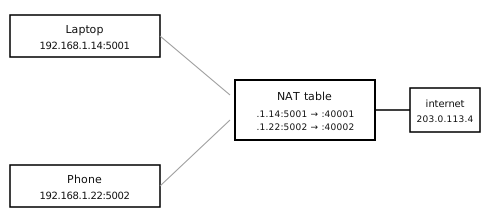
NAT is the trick that lets many private addresses share one public address.

This is also why a device on your network usually cannot be reached directly from outside, uninvited, unless the router is told to forward a specific port.
A NAT translation table mapping a laptop and phone's private IP and port to separate public ports on the router's single public IP
Ask:
"Walk me through what happens, step by step, from the moment I click a link to the moment the reply gets back to my specific device, in a house with three other devices on the same network."
Notes

Using a VPN

Without a VPNWith a VPN
Laptop → router (NAT) → ISP → destination site Laptop → router (NAT, unchanged) → ISP → encrypted tunnel → VPN server → destination site
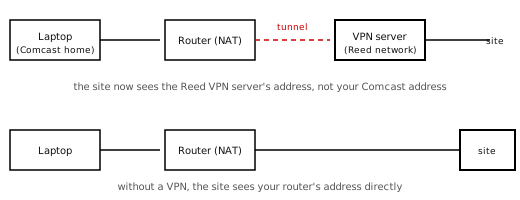
The destination site sees your router's public IP, which points back to your ISP and rough location. The destination site sees the VPN server's public IP instead of yours.
Your ISP can see every site you connect to. Your ISP can see that you are talking to a VPN server, but not what is inside the tunnel or which sites you actually reach.
Nothing changes on your home network. Your device still gets a private IP and still goes through NAT exactly as before. A VPN only changes what happens after traffic leaves your router.
Comparison of a connection with a VPN, laptop on a Comcast home network tunneling to a VPN server on the Reed network, where the destination site sees the VPN server's address, versus without a VPN, where it sees the router's address directly
Notes

Content Delivery Networks (CDNs)

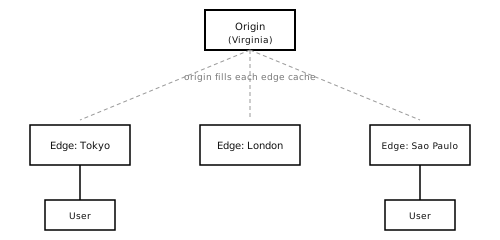
An origin server in Virginia filling edge server caches in Tokyo, London, and Sao Paulo, with nearby users reaching the closest edge server
Notes

Example: Why Is Pinging a Japanese University so Fast?

Pinging www.sfc.keio.ac.jp (Keio University, Japan) from a laptop in the US:

PING dh9uikqsvnji3.cloudfront.net (18.172.170.14): 56 data bytes
64 bytes from 18.172.170.14: icmp_seq=0 ttl=245 time=5.661 ms
64 bytes from 18.172.170.14: icmp_seq=1 ttl=245 time=4.509 ms
64 bytes from 18.172.170.14: icmp_seq=2 ttl=245 time=4.166 ms
64 bytes from 18.172.170.14: icmp_seq=3 ttl=245 time=4.407 ms
64 bytes from 18.172.170.14: icmp_seq=4 ttl=245 time=4.191 ms
--- dh9uikqsvnji3.cloudfront.net ping statistics ---
5 packets transmitted, 5 packets received, 0.0% packet loss
round-trip min/avg/max/stddev = 4.166/4.587/5.661/0.552 ms
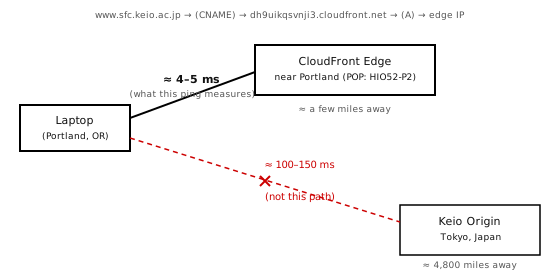
A laptop in Portland pinging www.sfc.keio.ac.jp: DNS resolves the name to a nearby CloudFront edge server, a short fast path at about 4-5 ms, not to Keio's actual origin server in Tokyo, a long path of about 100-150 ms that this ping never takes
ping only measures the path to that nearby edge server. It says nothing about whether Keio's actual origin server is up, or how the site performs once the edge has to fetch uncached content all the way from Japan.

To see the DNS chain directly: dig www.sfc.keio.ac.jp. To see CDN headers on the real HTTP response: curl -I https://www.sfc.keio.ac.jp.

Ask:
"If ping shows me hitting a CloudFront edge near me, does that mean Keio's real server in Japan could be offline and I'd never know? How would I actually check that?"
Notes

dig www.sfc.keio.ac.jp

% dig www.sfc.keio.ac.jp
...

;; QUESTION SECTION:
;www.sfc.keio.ac.jp.        IN  A

;; ANSWER SECTION:
www.sfc.keio.ac.jp.     10800 IN CNAME dh9uikqsvnji3.cloudfront.net.
dh9uikqsvnji3.cloudfront.net. 60 IN A   3.163.24.7
dh9uikqsvnji3.cloudfront.net. 60 IN A   3.163.24.126
dh9uikqsvnji3.cloudfront.net. 60 IN A   3.163.24.49
dh9uikqsvnji3.cloudfront.net. 60 IN A   3.163.24.107

;; Query time: 168 msec
;; SERVER: 8.8.8.8#53(8.8.8.8)
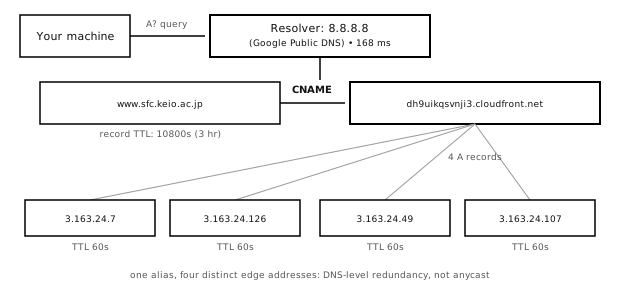
The dig www.sfc.keio.ac.jp resolution chain: your machine queries the resolver 8.8.8.8, which returns a CNAME to dh9uikqsvnji3.cloudfront.net with a 10800 second TTL, which resolves to four separate A records, each an edge IP address with a 60 second TTL
Notes

Is the Original Site Actually Up?

A cached edge response can look perfectly healthy even if the real origin server is completely offline. ping alone cannot tell the difference.

A CDN's whole job is to hide origin trouble from you for as long as the cache stays valid. That is a feature for visitors, and exactly why it is not a reliable way to check whether the origin itself is healthy.
Notes

curl -I https://www.sfc.keio.ac.jp (getting the header of the html request)

%curl -I https://www.sfc.keio.ac.jp
...
HTTP/2 301
server: CloudFront
content-length: 0
location: https://www.keio.ac.jp/ja/sfc/
x-cache: Hit from cloudfront
via: 1.1 ac695892d6ed07904483819bdb88134e.cloudfront.net (CloudFront)
x-amz-cf-pop: HIO52-P2
x-amz-cf-id: J_1ub4-jF8LdPNN16ptRAnb813nqBCojomRayElIFFdTxJ0wh4unMg==
age: 17
...
A cache hit is not proof the origin is healthy. To actually test it, rerun curl -I against the redirect target with a cache-busting query string and look for x-cache: Miss from cloudfront instead.
Notes

Why Do Universities Put a CDN in Front of Their Site?

Keio is not unusual. MIT and most universities with a global audience sit behind a CDN too.

Ask:
"If almost every big institution's public website is really 'a CDN, with their own server somewhere behind it,' what does that mean for who actually controls what that institution's site says or does?"
Notes

Anycast

Different than the Keio example. There, DNS handed back different literal IP addresses depending on where the query came from, that is CloudFront's mechanism. With anycast, the address itself never changes: the same IP is announced everywhere, and it is routing, not DNS, that decides which copy answers.
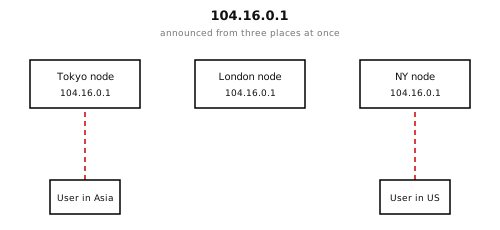
The same anycast address, 104.16.0.1, announced from Tokyo, London, and New York nodes, with users in Asia and the US each routed to their nearest node
Routing picks the nearest node automatically. Same address either way.
Ask:
"How is anycast different from a CDN redirecting me with DNS? Aren't they solving the same problem?"
Notes

Anycast example: The DNS Root Servers

The internet has 13 lettered root servers, A through M. Every one of them is a real example of anycast running today.

The 13 letters, each its own anycast address (not one shared address for all of them):
LetterIP addressOperator
A198.41.0.4Verisign
B170.247.170.2USC-ISI
C192.33.4.12Cogent Communications
D199.7.91.13University of Maryland
E192.203.230.10NASA Ames Research Center
F192.5.5.241Internet Systems Consortium
G192.112.36.4Defense Information Systems Agency
H198.97.190.53U.S. Army Research Lab
I192.36.148.17Netnod
J192.58.128.30Verisign
K193.0.14.129RIPE NCC
L199.7.83.42ICANN
M202.12.27.33WIDE Project
A handful of addresses, hundreds of real machines. Each letter's single IP address is independently announced from hundreds of physical sites worldwide, roughly 1,500–2,000 instances total across all 13, and growing. Anycast is the reason one address can mean one server and hundreds of physical locations at the same time.
Notes

Prehistory of the Cloud: "Klein Worms" (1971)

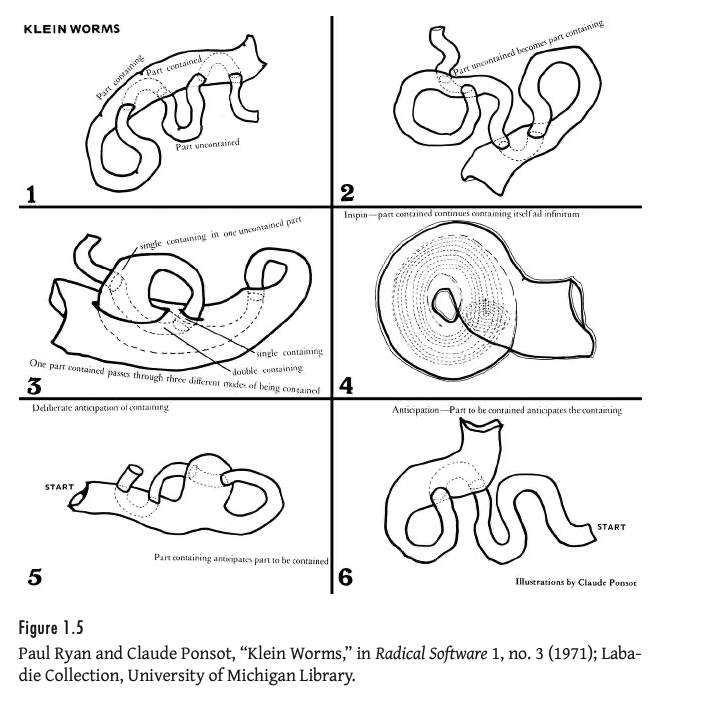
Long before anycast routing existed, artists were already drawing what it feels like: the same identity, held open in more than one place at once, folding a part that contains into a part that is contained.

Six numbered diagrams of topological worm-like loops folding into and containing themselves, titled Klein Worms
Paul Ryan and Claude Ponsot, “Klein Worms,” in Radical Software 1, no. 3 (1971); Labadie Collection, University of Michigan Library. Reproduced in Tung-Hui Hu, A Prehistory of the Cloud, p. 26. Source essay: Paul Ryan, “Cybernetic Guerrilla Warfare,” Radical Software 1, no. 3 (1971).
Notes

Summary

Notes