Lab: Plain Text to HTML
Open plain_text.txt, a recipe for Fresh Multi-Bean Salad. Your job is to turn it into a proper HTML file, one checkpoint at a time.
Do not paste the whole recipe into Copilot or ChatGPT and ask for the full HTML conversion. Work the checkpoints below in order, and only prompt the AI for the checkpoint you're currently on. Read what it gives you before accepting it.
How to prompt: highlight the exact lines you're working on, in
plain_text.txt or your in-progress recipe.html, then use inline chat (Cmd+I / Ctrl+I in VS Code, or your editor's equivalent) to ask your question about just that selection. Don't type a broad request from scratch, and don't select more than the current checkpoint.
Recognizing "Next Edit Suggestions": while you type, VS Code may pop up a suggestion on its own, shown in red and green, like this:
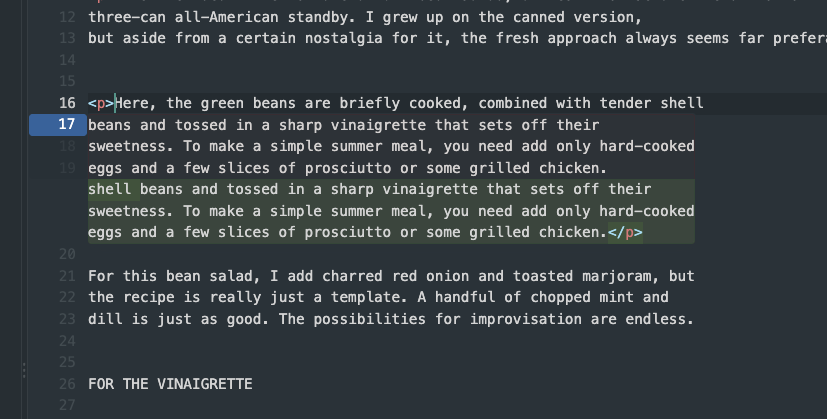
The green block is a preview of the "after" state, what the line will look like if you accept, not new text being invented. Check it against your own words: it's just echoing your existing sentence with the edit added.
The green block is a preview of the "after" state, what the line will look like if you accept, not new text being invented. Check it against your own words: it's just echoing your existing sentence with the edit added.
- Accept: press
Tabto jump to the suggestion, thenTabagain to apply it. - Reject: press
Esc, or just keep typing. Nothing is applied until you deliberately Tab into it and accept.
Do not use the
<pre> tag. It will prevent the CSS and JavaScript exercises from working later. Use proper HTML elements for every part of the content.
Checkpoint 1: Boilerplate
Create a new file called
Check before moving on: the file opens in Chrome as a blank page with the correct tab title. Nothing else.
recipe.html with the full HTML boilerplate (<!DOCTYPE html>, <html>, <head>, <title>, <body>). No content yet.
Check before moving on: the file opens in Chrome as a blank page with the correct tab title. Nothing else.
Checkpoint 2: Structure
Copy the content of plain_text.txt in between the body tags
Mark up the content using appropriate HTML tags:
Check before moving on: the page reads top to bottom without needing the plain text original, and you can say out loud why you picked each tag.
- Recipe title → heading
- Introductory paragraphs →
<p> - Ingredient sections → headings + lists (
<ul>) - Numbered preparation steps →
<ol>
Check before moving on: the page reads top to bottom without needing the plain text original, and you can say out loud why you picked each tag.
Checkpoint 3: Author and source
Add the author and source line using a semantic tag. Think about which one fits, and try it yourself before asking the AI. Then ask it to confirm your choice or suggest an alternative.
Check before moving on: you can explain why you chose that tag over the others.
Check before moving on: you can explain why you chose that tag over the others.
Checkpoint 4: Emphasis
Use emphasis where it adds meaning: ingredient quantities, section labels, key instructions. Use
<strong> or <em>, not <b> or <i>.
Before you show the instructor:
- The page opens correctly in Chrome
- The structure is clear, a reader could navigate it without seeing the plain text original
- No
<pre>tags anywhere in the file - You can explain what every tag does if asked
Common mistakes to watch for: students wrapping everything in <pre> (explicitly forbidden, it defeats the purpose and breaks later labs), using <br> instead of <p> for paragraphs, not using <ol> for the numbered steps. Watch especially for students batching several checkpoints into one AI prompt anyway (e.g. asking for structure and emphasis together); that defeats the point of the checkpoints. The author/source line is a good opportunity to discuss <address> or <footer>, let students reason about it with Copilot first.