You don't need the internet to use AI. Ollama lets you download and run language models locally on your own computer, for free, with no account required.
Step 1: Install Ollama and try a model:
- Download and install Ollama (Mac / Windows / Linux). This installs a background service and a native desktop app with its own chat window. Look for the Ollama icon in your menu bar (Mac) or system tray (Windows).
- Easiest path: open the Ollama app, click the model dropdown at the top, and choose gemma4:e2b. Picking a model you don't have yet downloads it automatically (~7 GB) and drops you straight into a chat window, no terminal needed.
gemma4:e2b is one option among many, see the next slide to compare sizes, tags, and strengths across models.
Step 2: Connect Ollama to VS Code:
VS Code's old built-in Ollama provider is being retired. As of summer of 2026, use VCS's built in Ollama provider.
If that does not work, install the official Ollama extension instead (maintained directly by the Ollama team):
- Open the Extensions view in VS Code and install Ollama (publisher: Ollama), or open Quick Open (
Cmd+P / Ctrl+P) and paste ext install ollama.ollama
- Make sure Ollama is running (the desktop app, or
ollama serve in a terminal)
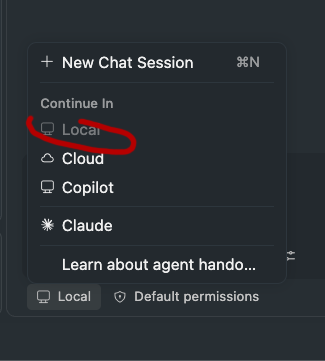
- Open Copilot Chat, click the model picker at the bottom of the chat input, and choose a model from the Ollama section. It auto-discovers whatever's running at
http://127.0.0.1:11434, no manual setup needed
- If your models don't show up: run Ollama: Refresh Models from the Command Palette. If that doesn't fix it, run Ollama: Diagnose Models and check the "Ollama" output channel.
Step 3: Choose gemma4 as your model:
- Open Copilot Chat
- Click the model name at the bottom of the chat panel, this opens the model picker
- Select gemma4:e2b from the Ollama section
- To set it as the default: click the model picker → find gemma4:e2b → click the star or "Set as default" option
Known limitation: Agent mode with local models.
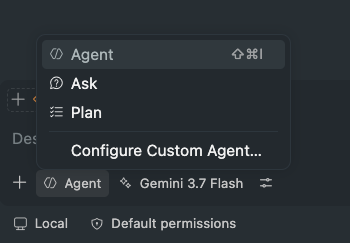
- Most local models are really only reliable for Ask mode (chat, explain, answer questions), even ones tagged "tools" on Ollama. gemma4:e2b and qwen2.5-coder:7b both fall in this bucket: fine for explaining code, but not dependable for Agent mode (autonomous file edits). You may see a model claim it "doesn't have tools" even though it's tagged as supporting them, or answer the same clarifying question twice without progressing, or print a raw JSON-looking tool call as plain chat text instead of actually running it. All of these are signs the model can't reliably drive Agent mode, not a bug in your setup.
- qwen3-coder:30b is, so far, the only model that has reliably worked as an agent (but only through the Cline extention). it actually wrote real, working code to a file. Treat every other local model on the previous list as Ask-only until proven otherwise: gemma4:e2b and qwen2.5-coder:7b both struggled in Agent mode across multiple tests.
- Cline extension: qwen3-coder:30b only worked reliably through Cline.
Always verify by checking the file, not by trusting the chat text. If the tool call looks malformed or the model just describes what it "would do," open the file and confirm nothing (or the wrong thing) happened before assuming it worked.
Watch your memory. Open
Activity Monitor (Mac) → Memory tab while Ollama is running.
- The Memory Pressure graph at the bottom tells you how hard your machine is working
- Green = fine Yellow = getting tight Red = overloaded, quit other apps
- Lab machines have 32 GB RAM; gemma4:e2b uses roughly 7 GB, so there is plenty of room
Why bother running AI locally?
Your data never leaves your computer. No usage limits. Works offline. Good for understanding how these models actually function, they're just files sitting in a folder on your disk.
Ollama runs a local server on port 11434. VS Code's built-in Ollama BYOK provider was deprecated in favor of the official Ollama extension (publisher: Ollama, id ollama.ollama), maintained by the Ollama team so it keeps pace with new Ollama models/features. Install it from the Extensions view or via "ext install ollama.ollama" in Quick Open. It auto-discovers models from the local Ollama server (127.0.0.1:11434), no manual "Add Models" step required. Requires VS Code 1.120+, Ollama running, at least one pulled model. Local models need no sign-in; "ollama signin" is only for Ollama's cloud-hosted models. Troubleshooting commands: "Ollama: Refresh Models" and "Ollama: Diagnose Models". GitHub Copilot Free is sufficient, no paid plan needed to use local models. Memory pressure in Activity Monitor reflects RAM/disk swapping; yellow/red means responses will slow down significantly.